Use app-based Conditional Access policies with Intune
Microsoft Intune app protection policies work with Microsoft Entra Conditional Access to help protect your organizational data on devices your employees use. These policies work on devices that enroll with Intune and on employee owned devices that don't enroll. Combined, they're referred to app-based Conditional Access.
App protection policies are rules that ensure an organization's data remains safe or contained in a managed app:
- An app protection policy can be a rule that's enforced when a user attempts to access or move your organizations data, or a set of actions that are prohibited or monitored when a user is working inside a managed app.
- A managed app is an app that has app protection policies applied to it, and can be managed by Intune.
- You can also block the built-in mail apps on iOS/iPadOS and Android when you allow only the Microsoft Outlook app to access Exchange Online. Additionally, you can block apps that don't have Intune app protection policies applied from accessing SharePoint Online.
App-based Conditional Access with client app management adds a security layer that makes sure only client apps that support Intune app protection policies can access Exchange online and other Microsoft 365 services.
In addition to app-based Conditional Access policies, you can use device-based Conditional Access with Intune.
Prerequisites
Before you create an app-based Conditional Access policy, you must have:
- Enterprise Mobility + Security (EMS) or an Microsoft Entra ID P1 or P2 subscription
- Users must be licensed for EMS or Microsoft Entra ID
Supported apps
A list of apps that support app-based Conditional Access can be found in Conditional Access: Conditions in the Microsoft Entra documentation.
How app-based Conditional Access works
In this example, the admin has applied app protection policies to the Outlook app followed by a Conditional Access rule that adds the Outlook app to an approved list of apps that can be used when accessing corporate email.
The following flowchart can be used for other managed apps.
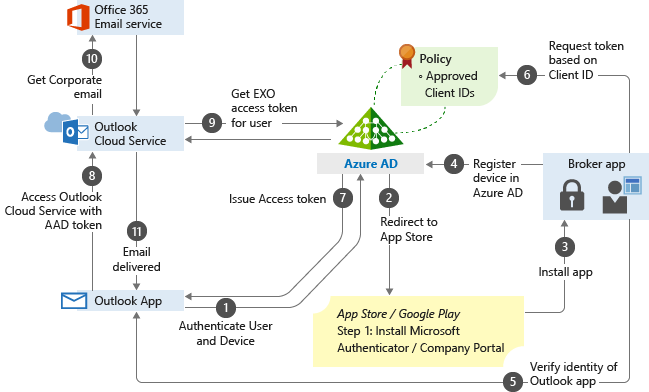
- The user tries to authenticate to Microsoft Entra ID from the Outlook app.
- The user gets redirected to the app store to install a broker app when trying to authenticate for the first time. The broker app can be the Microsoft Authenticator for iOS, or Microsoft Company portal for Android devices. If users try to use a native email app, they are redirected to the app store to then install the Outlook app.
- The broker app gets installed on the device.
- The broker app starts the Microsoft Entra registration process, which creates a device record in Microsoft Entra ID. This process isn't the same as the mobile device management (MDM) enrollment process, but this record is necessary so the Conditional Access policies can be enforced on the device.
- The broker app confirms the Microsoft Entra device ID, the user, and the application. This information is passed to the Microsoft Entra sign-in servers to validate access to the requested service.
- The broker app sends the App Client ID to Microsoft Entra ID as part of the user authentication process to check if it's in the policy approved list.
- Microsoft Entra ID allows the user to authenticate and use the app based on the policy approved list. If the app isn't on the list, Microsoft Entra ID denies access to the app.
- The Outlook app communicates with Outlook Cloud Service to initiate communication with Exchange Online.
- Outlook Cloud Service communicates with Microsoft Entra ID to retrieve Exchange Online service access token for the user.
- The Outlook app communicates with Exchange Online to retrieve the user's corporate email.
- Corporate email is delivered to the user's mailbox.
Next steps
- Create an app-based Conditional Access policy
- Block apps that don't have modern authentication
